





























































https://www.youtube.com/watch?v=qGETnlNm_lU&t=1s Wondershare Filmora’s latest suite of AI-driven features introduces the AI Thumbnail Creator, designed to effortlessly enhance the visual appeal of video projects. This tool and others like AI Portrait, AI Voice Enhancer, AI Smart Masking, and AI Copywriting significantly streamline video editing, making it accessible to creators of all skill levels. The AI Thumbnail Creator, in particular, automates creating engaging thumbnails by analyzing video content to identify the most visually striking frames, ensuring your videos attract more views right from the first glance. Filmora’s cross-platform capabilities ensure that whether you’re editing on Windows, macOS, iOS, or Android, you can seamlessly switch between devices without losing progress, offering unmatched flexibility in video editing. This feature set enhances productivity and fosters creativity, allowing you to focus more on storytelling and less on technical details. Discover the possibilities with Filmora and transform how you produce content with tools that push the boundaries of digital creativity.
Filmora’s AI Thumbnail Creator and More
Filmora continues to lead the pack in video editing innovation by introducing the AI Thumbnail Creator, a feature designed to revolutionize how users engage with their content. This tool automatically generates eye-catching thumbnails by analyzing video content to identify the most impactful frames, ensuring that videos stand out and capture more views. Beyond the Thumbnail Creator, Filmora enriches its suite with other AI-driven tools like AI Portrait, AI Copywriting, and AI Smart Masking, each enhancing the editing process with specific benefits. AI Portrait focuses on refining subject visibility, making it invaluable for explicit, professional-looking videos. AI Copywriting assists in generating engaging titles and descriptions, optimizing SEO and viewer interest. AI Smart Masking offers precision in applying effects to specific areas without altering the entire frame, which is perfect for detailed editing. These features demonstrate Filmora’s commitment to AI integration, which significantly streamlines the editing workflow, reduces manual effort and boosts the overall quality of content. By automating routine tasks and enhancing creative decisions, Filmora allows users to concentrate more on their videos’ narrative and emotional impact. This seamless blend of technology and usability ensures that creators of all skill levels can quickly produce stunning, professional-quality videos across any platform—Windows, macOS, iOS, or Android—enhancing Filmora’s appeal as a versatile and powerful editing solution.
Use Cases
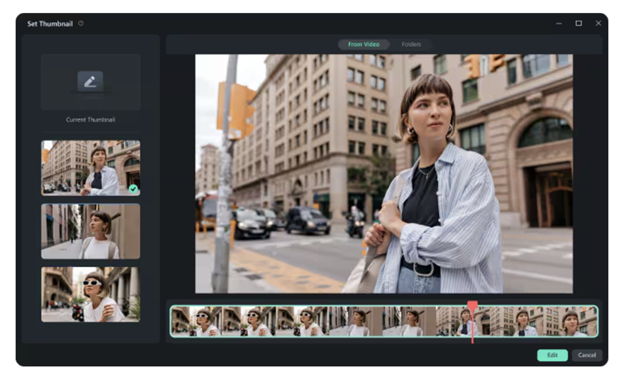 Enhancing your video projects with Filmora’s AI Thumbnail Creator can transform how viewers interact with your content. Here are additional ways to utilize this feature:


- Event Highlight Videos: The thumbnail creator can pick the most vibrant and action-packed moments for event recap videos, making the video more enticing to potential viewers at a glance.
- Portfolio Showcases: Artists and designers can generate thumbnails highlighting the most captivating parts of their videos, drawing more attention to their online portfolios.
- Marketing Product Demos: Automatically generate thumbnails that focus on product features for marketing videos, helping potential customers understand the video without having to watch it first.
Filmora’s Video Editing Solutions
Explore the world of Filmora, where every tool, including the new AI Thumbnail Creator, has been crafted to enhance your video editing experience. This tool takes the guesswork out of creating compelling thumbnails, automatically generating them to capture viewer attention immediately. Alongside this, Filmora’s suite of AI features helps polish every aspect of your video, ensuring professional results with minimal effort. What sets Filmora apart is its universal accessibility. Edit seamlessly across Windows, macOS, iOS, and Android, and enjoy the same rich functionality whether on a tablet at the beach or a desktop in your studio. Filmora’s toolkit caters to creators of every skill level, enabling them to turn raw footage into engaging stories with just a few clicks. Dive into Filmora’s ecosystem and discover how its innovative, user-friendly tools transform video editing into a more intuitive and enjoyable process.
Conclusion
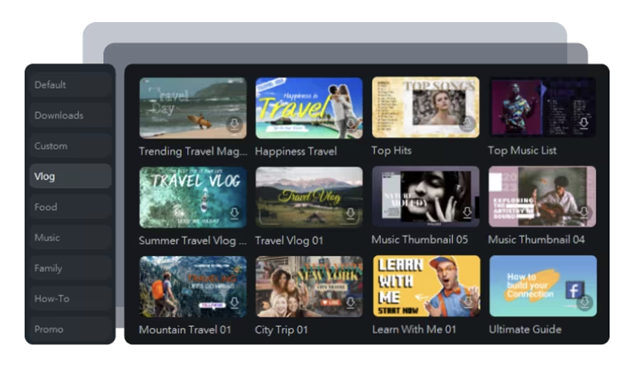 Filmora’s AI Thumbnail Creator represents a significant leap forward in streamlining video editing, offering amateur and professional creators a powerful tool to enhance their projects. By automating the creation of engaging thumbnails, this feature not only saves time but also ensures that videos stand out in the crowded digital landscape. Alongside the Thumbnail Creator, Filmora’s suite of AI tools—including AI Portrait, AI Smart Masking, and AI Copywriting—further empowers users to produce content that is not only high-quality but also compelling and tailored to their audience. These tools are part of Filmora’s commitment to providing a comprehensive video editing solution accessible across various platforms. Whether you are working from a desktop in an office or on a mobile device in the field, Filmora’s cross-platform functionality guarantees a seamless experience. This flexibility is crucial for creators who demand consistency and efficiency, irrespective of their working environment. By integrating these advanced AI capabilities, Filmora sets new standards in the video editing industry, enabling creators to focus more on creative storytelling and less on the technical complexities of video production. The AI Thumbnail Creator and other innovative features are a testament to Filmora’s ongoing evolution and dedication to enhancing user experience. As video content continues to dominate digital communication, tools like these are invaluable for anyone looking to make an impact online.